
# Architecture
# Overview
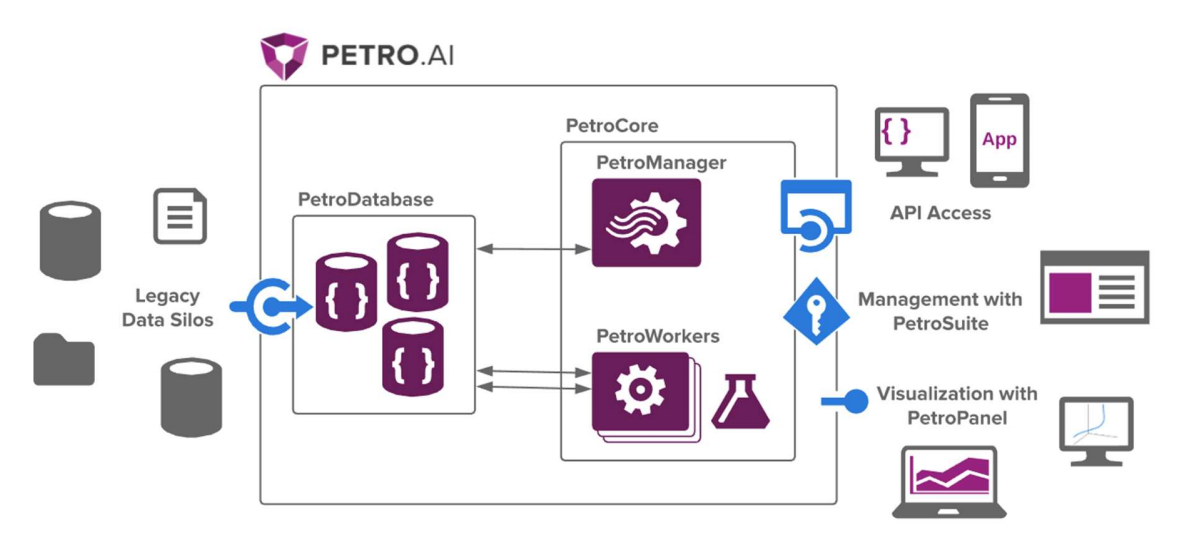
The diagram below will act as a reference for vocabulary used throughout this document.
# PetroDatabase
Petro.ai utilizes the MongoDB 4.0 Community Server as a flexible and scalable NoSQL database. MongoDB allows for easy deployment and scalability both on-prem and in the cloud. Utilizing a NoSQL database such as MongoDB also allows Petro.ai to efficiently model complex hierarchical relationships into a single document view. This document structure allows for applications to quickly query for the data they need without complex join logic often found in SQL databases.
Petro.ai applications rely on an oil and gas schema developed by Petro.ai to ensure documents inserted into or updated are structured correctly. Interfaces with Petro.ai are facilitated by Petro.ai applications, application programming interface (API) calls, or via libraries (R, Python) which ensure that the schema is followed, and the integrity of data is maintained. Direct insertion or updates to Petro.ai collections are strongly discouraged.
# PetroManager
PetroManager is an API server that can be deployed to a virtual private cloud or on-premise. PetroManager’s main role is that of a dispatcher. It receives incoming requests from end users and applications, schedules them with the PetroDatabase for a worker to complete, then notifies the requester that the work has been complete.
# PetroWorker
The PetroWorker takes complex and asynchronous tasks that have been scheduled by PetroManager and executes them. Jobs are optimized to utilize all threads available on the server to efficiently complete the job. As jobs are executed, results are stored in the PetroDatabase before the PetroWorker signals that job is complete. Petro.ai can scale horizontally, handling many PetroWorkers if needed.
# PetroCore
Together, the PetroManager and PetroWorker are PetroCore. PetroCore features a RESTful API that facilitates interacting with the PetroDatabase, and the ability to create and manage jobs that can be run on the server.
The API allows developers to programmatically integrate Petro.ai into custom programs. Convenient scripting libraries make interacting with the API easier. The API documentation can be used to write your own corporate libraries for accessing the API. For security, the API uses API keys which can be generated by an organization’s administrator via the Petro.ai Portal. In addition to security, these keys have the added benefit of being able to monitor developer use of this service.
Many of Petro.aiapplications are built leveraging the API to access and store data, as well as to create and manage jobs. This API allows developers to do the same, customizing Petro.ai to fit your organization's needs.
# PetroSuite
The user interface of Petro.ai is the PetroSuite. PetroSuite allows administrators to:
- Create new users
- Monitor Petro.ai deployment status and health
- Provide custom unit definitions for the organization
- Load and process data from flat files and disperate databases
- Schedule various Petro.ai operations or run these tasks ad-hoc
- Browse data in the PetroDatabase
# PetroPanel
The PetroPanel allows users to connect to Petro.ai from within Spotfire. It allows for data to be saved to and loaded from Petro.ai with pre-configured actions. The PetroPanel is a built-in Spotfire panel that allows users to search for data types in Petro.ai and pull data directly into the analysis using their Spotfire marking.
# Petro.ai Portal
Petro.ai Portal is the distribution center for Petro.ai software, Spotfire Extensions, license management, and API access management.